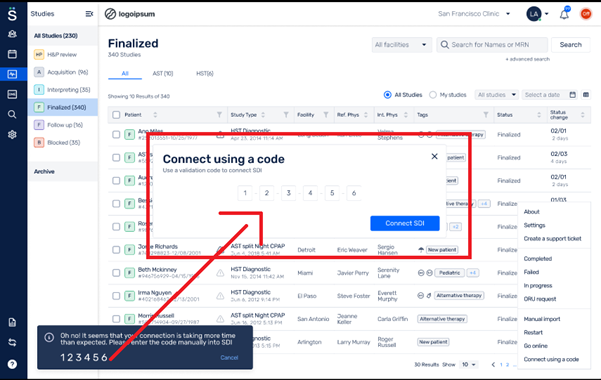
Virtual SDI :
Who should install Virtual Somnoware Device Interface (SDI)?
Virtual SDI is recommended for users who need to connect Somnoware SDI from their workstation to a virtual environment such as Citrix.
How to connect using Virtual SDI?
Somnoware’s web application requires one of the following user actions to connect to SDI:
- If the SDI icon located at top right corner is red, click to activate. Wait until the icon turns green to proceed.
- SDI can also be activated by clicking on action buttons such as view tracing or check-out device.
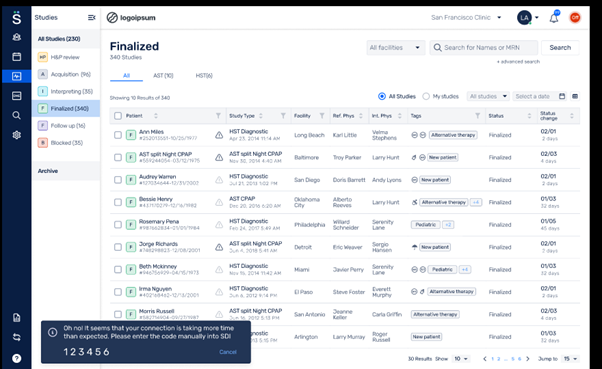
If SDI fails to automatically connect, proceed to enter the 6-digit code that appears in the pop-up widow of the lower left of your display.
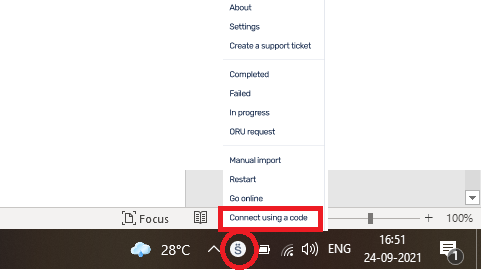
- Hover over the Somnoware Icon in the System Tray and right click to select “Connect using a code.”
- Enter the 6-digit code to activate SDI.