October 2021, Release Notes
New features added to Somnoware in addition to the continued performance improvements:
Key Features:
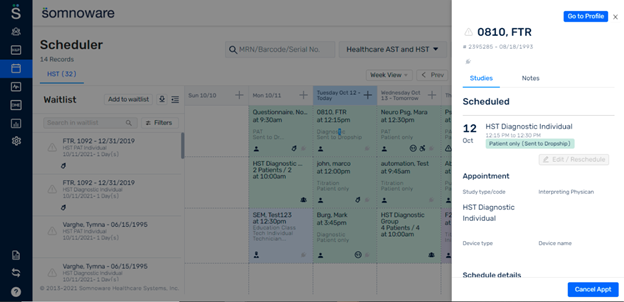
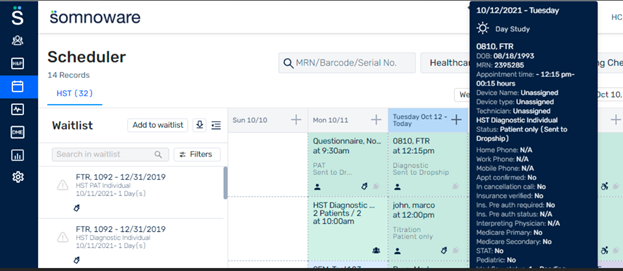
- Display the status on Scheduler after a schedule is sent to dropship (Dropship feature enhancement)
Details:
What is the Dropship feature?
Certain sleep labs push WatchPAT orders/schedules to the Itamar team for handling the device check-out, Shipping, and device check-in. We released a feature where in patients (orders) can be pushed to the dropship facility from the source facility.
Note: Please contact Somnoware Support to configure the Dropship feature.
How can orders be pushed to the Dropship location?
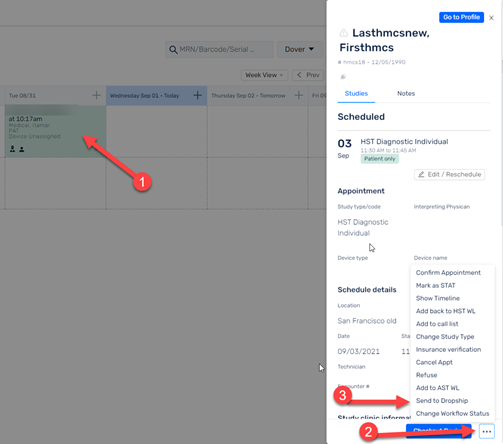
A. Option to push to dropship from the scheduler
- Open the schedule sidebar.
- Click on the secondary action button at the bottom of the sidebar
- Select the option Send to Dropship.
- Select the Device type like WatchPAT 300, or WatchPAT 200. Description can be added and that would save as the patient notes. Patient notes will get transferred to the dropship facility.
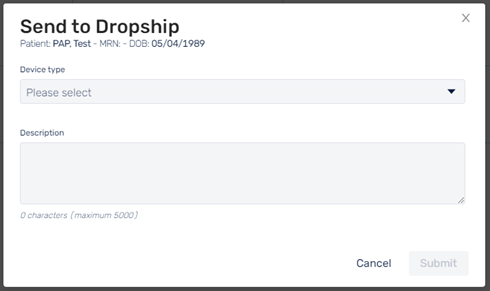
- Click Submit. This would push the order to the Dropship facility.
B. Option to push to Dropship from the Waitlist
This is an existing feature. Only change here is, it would bring up the above screen.
C. Option to push to Dropship from the patient profile
1. Click on the secondary action button at the top right side of the patient profile.
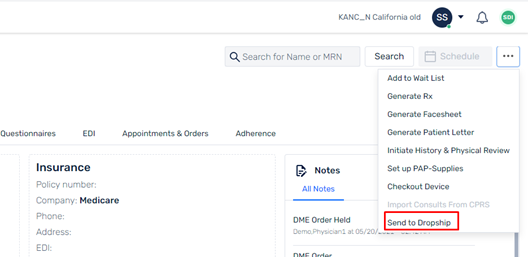
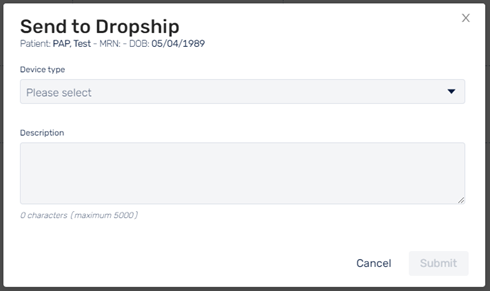
This would bring the following screen.
2. Select the Device type and click Submit. This will add a history in the Appointments and Orders tab in the patient profile.
Display the status on Scheduler after a schedule is sent to dropship
This feature displays the status ‘Sent to Dropship’ on the Scheduler (Schedule grid, hover message and View Schedule screens), after the patient is pushed to the dropship facility.